Location
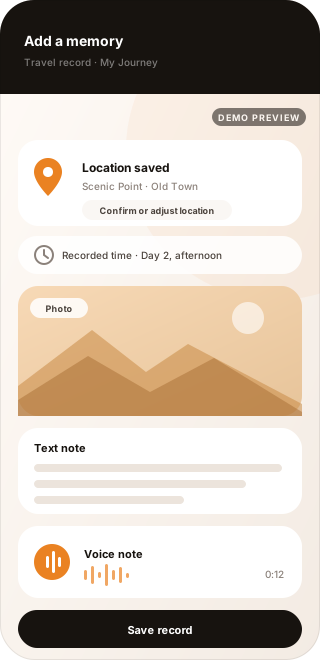
A record keeps where the moment happened. The detected location can be confirmed or adjusted before the record is saved.

Smart Travel
Tavino AI keeps travel memories where the trip happened — a location, a photo, a written line, a voice memo — saved even when the signal drops, then laid out as a day-by-day timeline your family group can read together long after you are home.
Your Journey
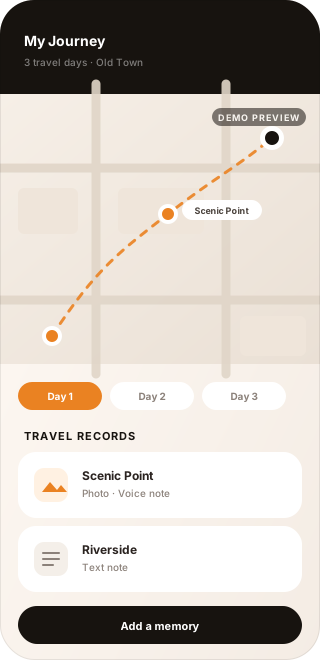
A journey begins before the first photo. A trip in Tavino AI holds a name, the days it covers, and the region you are travelling in — and everything you record along the way belongs to it.
A journey starts with what you want to call it and the days it covers. Everything recorded during that time belongs to the same trip.
The area you are travelling in frames the trip, so the records that follow read as one journey rather than scattered entries.
Records are grouped by trip and by day, so a journey stays organized while it is still happening — not only after you get home.
Travel Records
A travel record can bring together where a moment happened, what you saw, what you wrote, and what you wanted to remember in your own voice.
A record keeps where the moment happened. The detected location can be confirmed or adjusted before the record is saved.
Photos taken at the stop stay attached to the record, next to everything else you kept from that moment.
A short written note holds the part of a moment a photo does not show — why you stopped, who you were with, what you noticed.
A voice memo keeps the moment in your own words, recorded while you are still standing in it.
Offline Travel Records
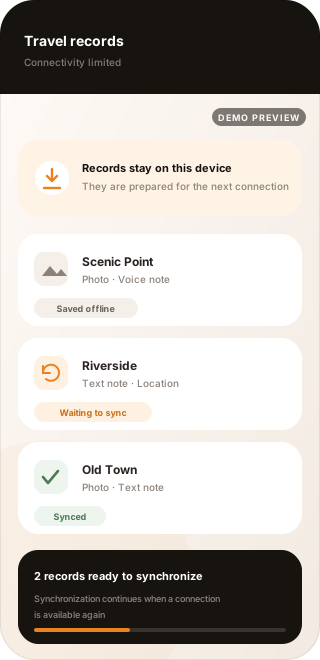
Records can be created while connectivity is limited and prepared for synchronization when a connection returns. The moment does not have to wait for a signal, and you can see where each record stands.
A record created while connectivity is limited stays on the device with its location, photos, and notes.
The record is prepared for synchronization and waits until a connection is available again.
Once synchronization completes, the record joins the rest of the journey.
Offline support applies to creating and keeping travel records on the device. Not every Tavino AI feature works without an internet connection.
Offline to Sync
A record made without a connection is not a record on hold. It has its own state from the moment it is saved until the day it belongs to is complete again.
A location, a photo, a note, or a voice memo is saved to the trip at the moment it happens.
While connectivity is limited, the record stays on the device with everything it was made from.
When a usable connection comes back, the records waiting on the device are picked up again.
Pending records start synchronizing, and each one keeps its own state while it is in progress.
Synchronized records join the rest of the trip, in the day and the order they belong to.
Sync depends on connection, device conditions, and service availability.
Travel Memories
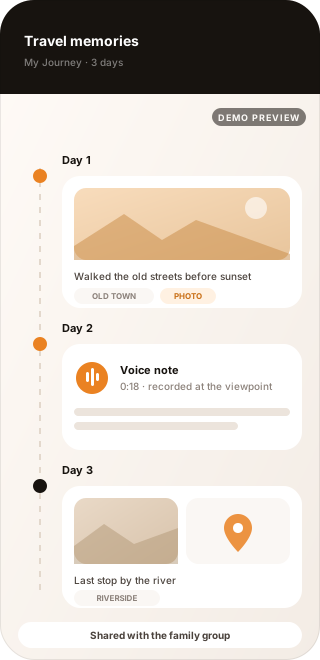
Records made along the way become a journey timeline. A trip reads like a travel journal — the places, the photos, the voice you recorded at the viewpoint — instead of a folder you have to piece back together.
Day 1, Day 2, and Day 3 hold what happened in them, so a journey can be read in the order you lived it.
A photo, a voice note, a written line, and a location sit together instead of being split across separate apps and folders.
After the trip, the journey is still a sequence of moments — something a family revisits together rather than a folder anyone has to search.
Family Connection
A trip does not have to be something your family hears about afterwards. The journey connects to the family group you already share, so the people at home can follow along while you are still travelling.
Travel builds on the group your family already shares in Tavino AI. A separate travel group is not created.
What family members can see follows the sharing rules and permissions already set in that group, not a new set of travel rules — so a trip is shared with family without becoming public.
Location sharing during a trip depends on device permissions, network conditions, and GPS availability, so it can be delayed or unavailable.
How It Works
Five steps carry one moment from the road to the people waiting at home.
Give the journey a name, the days it covers, and the region you are travelling in.
Save a location with photos, a text note, or a voice note while you are still there.
When connectivity is limited, the record is kept on the device instead of being lost.
Pending records continue synchronizing once a connection is available again.
The trip becomes a timeline you can look back on and share with your family group.
The journey keeps its own order. Records stay attached to the trip and the day they belong to, whether they were saved with a full connection or kept on the device until one returned.
What to Expect
Travel happens in tunnels, on mountain roads, and in places where a signal comes and goes. These are the conditions Smart Travel is built around — and what it does not try to promise.
Location information can be delayed or unavailable depending on device permissions, network conditions, and GPS availability.
Offline records remain on the device until they can be synchronized, so a moment can be recorded long before there is any way to upload it.
Synchronization depends on connectivity and service availability, so pending records may finish syncing later than the moment they were made.
Tavino AI supports travel recording and family connection but does not replace emergency or navigation services.
Travel shares the same family group as the rest of Tavino AI — the map that shows where everyone is, the places a week is built around, and the everyday conversations that keep a family close.
The places you save at home work the same way on a trip — see how a saved place marks an arrival. Membership brings travel, care, and the shared map together for one family group, so see which plan includes Smart Travel, or return to the Tavino AI overview.